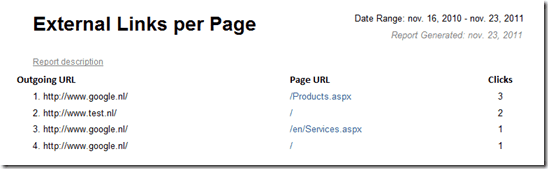
In this How To I'll show you how to extend Sitecore to track outgoing links trough the Sitecore Digital Marketing System (DMS). First off we start with creating a sublayout that saves the outgoing link clicks to the Analytics database. Next step is creating a solution for tracking the outgoing link. There are multiple solutions of tracking external links but in this series we are creating the following two solutions; one that tracks all outgoing links automatically (step 2.1) and the other solution where it´s possible to enable tracking for-each outgoing link (step 2.2)And off-course we finish with report that will show you the most clicked outgoing links. This how to is part of the series: How to track External Links with Sitecore DMS and contains the following steps:
-
Step 1: Save outgoing click to the DMS analytics database (status: finished, published)
-
Step 2: Two solutions for outgoing link tracking
-
Step 2.1: Measure alloutgoing links with a custom processor (status: finished, published)
-
Step 2.2: Measure specific outgoing links by creating a custom external link fieldtype
-
Step 2.2.1: Creating the custom external link fieldtype (status: review, publishdate: 17/05/2012**)**
-
Step 2.2.2: Creating pageeditor support for the custom external link fieldtype (status: coding)
-
Step 2.2.2: Tracking the external links that need to be tracked (status: on hold)
-
Step 3: Creating the outgoing link report (status: finished, published)
And off-course all publishdates are subjected to changes ;=)
Want to receive a reminder when a new article is publish subscribe to the RSS feed, maillinglist (in the right sidebar) or follow us on @new_guid Feel free to ask your questions in the comment form below.