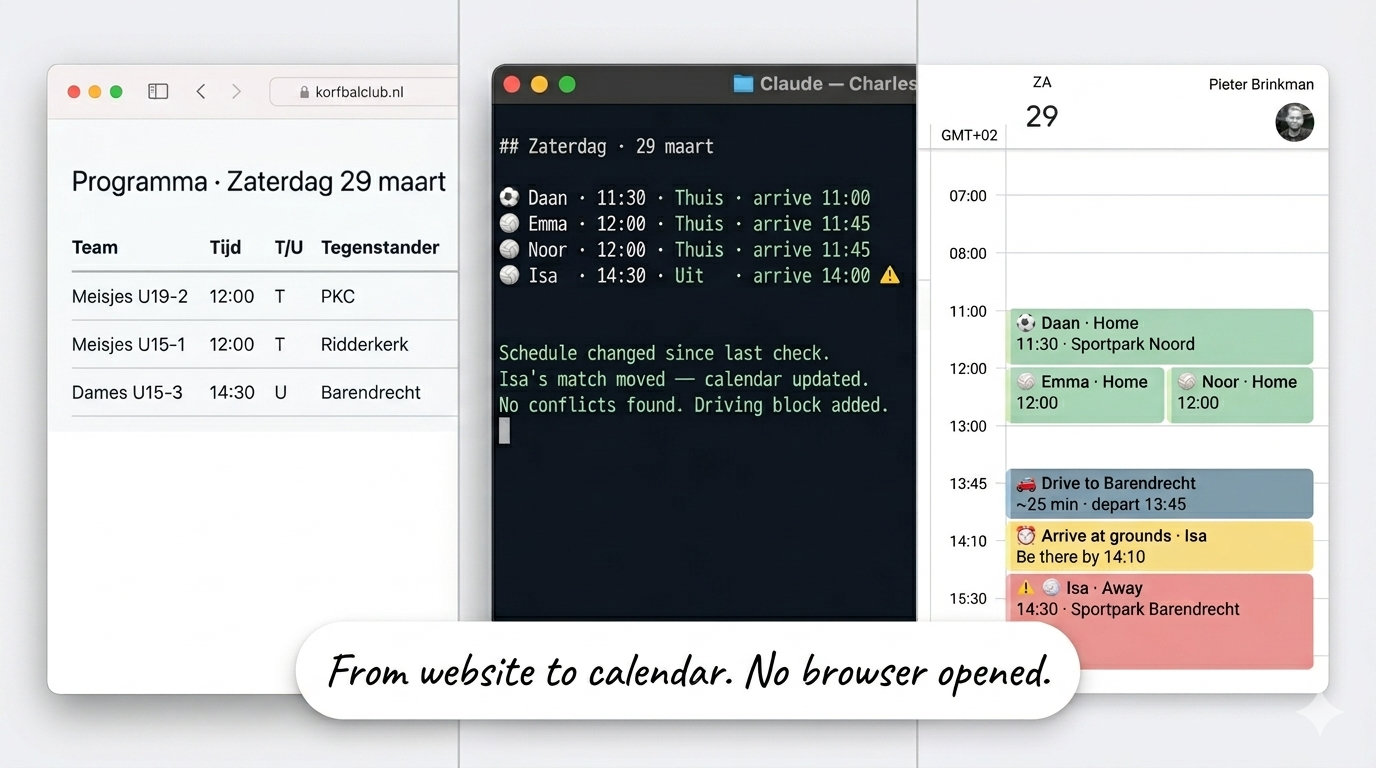
Saturday morning. Coffee barely poured. Four events already in the family calendar.
Wednesday evening, a scheduled task ran. Charles pulled up the soccer club website and found my son's match. Home game, 11:30 kickoff. Then he opened the korfbal schedule. korfbal is a Dutch sport, think basketball and netball had a child. The schedule page is fully JavaScript-rendered, so he spun up a headless browser to read it. Parsed the table. Found matches for three daughters: two at home, one away in the afternoon. Checked the family calendar for conflicts. None. Created four events with emoji titles, arrival times, and driving distances. Color-coded home versus away. Flagged an overlap in the afternoon so we could plan around it.
  ┌─────────────────────────┐   ┌─────────────────────────┐
  │  WEDNESDAY TASK         │   │  FRIDAY WEEKLY REVIEW   │
  │  scheduled · 21:00      │   │  manual trigger         │
  └────────────┬────────────┘   └────────────┬────────────┘
               │                             │
               └──────────────┬──────────────┘
                              │
                              ▼
                     ┌────────────────┐
                     │  VAULT         │
                     │  team names    │
                     │  divisions     │
                     │  home grounds  │
                     └───────┬────────┘
                             │
              ┌──────────────┴──────────────┐
              │                             │
              ▼                             ▼
    ┌──────────────────┐         ┌──────────────────────┐
    │  DuckDuckGo      │         │  Playwright           │
    │  soccer schedule │         │  korfball schedule    │
    │                  │         │  (JS-rendered)        │
    └────────┬─────────┘         └──────────┬────────────┘
             │                              │
             └──────────────┬───────────────┘
                            │
                            │   away games only
                            ├──────────────────────►  Google Maps
                            │                          travel time
                            │                          → arrive by X
                            ▼
         ┌────────────────────────────────────────┐
         │  Google Calendar                       │
         │                                        │
         │  conflict check · color code           │
         │                                        │
         │ ⚽ soccer  · 11:30 · home  🟢          │
         │ 🏐 korfbal · 12:00 · home  🟢          │
         │ 🏐 korfbal · 12:00 · home  🟢          │
         │ 🏐 korfbal · 14:30 · away  🔵  ⚠      │
         │                   overlap flagged       │
         └────────────────────────────────────────┘
Before I built this, Saturday morning planning was a Friday ritual. Open the soccer club website, find my son's team, note the time. Open the korfbal club website or app, scroll through the schedule, find three different teams for three daughters. Check which games are home and which are away, and how long the drive is. Figure out if the afternoon away game overlaps with the midday home game. Open Google Calendar, create four events manually, guess at arrival times. Twenty minutes on a good day. Longer if a schedule changed and I didn't notice.
No more websites. No manual schedule hunting. No figuring out who plays where and whether the afternoon away game conflicts with the morning kickoff. Charles did all of that. And he didn't do it from memory. No file in the vault listed Saturday's schedule.
The weekly review on Friday checks the schedules again. That week, a match had been rescheduled. Charles caught it during the Friday check, updated the calendar, and flagged it in the briefing. By the time Saturday morning came, the right time was already there.
You could build this with IFTTT or Zapier. A web scraper that checks the schedule, a calendar integration that creates events. I know because I tried. The difference is where the intelligence lives. An automation runs a fixed recipe: check URL, parse table, create event. If the page layout changes, the recipe breaks. If two games overlap, the recipe doesn't notice, or the recipe gets impossibly complex trying to handle it. If there's already a family birthday on the calendar, the recipe doesn't care.
MCP puts the data inside the AI conversation. Charles sees the schedule, the calendar, and the rules simultaneously. When an away game overlaps with another appointment, he flags it. When a match time changed, he notices because he reads the current page of the association, he compares it against what was already in the calendar, and updates it. The automation does one thing. The AI finds the patterns and does the thinking.
The vault holds what I've written down. CLAUDE.md holds how I want to work. Neither one has eyes. They can't see something that changed on a sports club website, check whether 11:30 is free, or know that the korfbal tournament moved from Saturday to Sunday.
The previous article ended with a question. The vault remembers. CLAUDE.md shapes behavior. But neither has live context. What happens when you give the system eyes and ears?
How MCP connects everything
MCP stands for Model Context Protocol. If that means nothing to you, you're not alone. Here's what it actually does.
An API is a specific connection to a specific service. If you want to read Google Calendar, you use the Google Calendar API. If you want Garmin data, you use the Garmin API. Each one has its own authentication, its own data format, its own quirks. Build ten connections, learn ten APIs.
MCP is not an API. It's a protocol. A common language that any service can implement. The difference matters. An API says "here's how to talk to me specifically." A protocol says "here's how anything can talk to anything."
Without MCP, Claude reads files and writes files in my vault. That's it. Powerful, but limited to what's already on disk. With MCP, Claude reads my calendar, tracks my workouts, fetches a web page, creates an event, searches the internet, controls my smart home. It goes from reading documents to participating in my day.
The best analogy I've found: USB for AI. You don't build a custom cable for every device you own. You build one port. Every device that speaks USB works. MCP is that port. Every data source that implements the protocol becomes available to the AI through the same interface. No custom integration per service. One standard. Many connections.
Before MCP, Claude was a reader. It consumed what you gave it and responded. With MCP, Claude becomes a participant. It doesn't wait for information. It can go out, get it, and act on it.
Here's what's connected to Charles right now:
- Google Calendar. Reads events, creates events, finds free time, checks conflicts.
- Notion. Task inbox, project database, and knowledge capture pipeline.
- Granola. Meeting transcripts from local storage.
- DuckDuckGo. Web search and clean page fetching via Jina Reader.
- Garmin. Training data, sleep, body battery, resting heart rate trends.
- Home Assistant. Smart home control, sensor data, automations.
- NotebookLM. Google's research AI. You've probably heard the audio overviews by now. Drop in documents, get structured summaries, study guides, and audio digests. The summaries sync to the vault, turning long reads to grounded research for context that Charles can reference.
Each one gives Charles a capability he didn't have before. Together, they turn a file-based assistant into one that sees what's happening right now.
A brief note on infrastructure: most MCP servers don't come pre-packaged. They need to be self-hosted: thin wrappers around existing APIs that speak the MCP protocol. I run all of them on a single mini PC under my desk. One entry point for every AI agent, one place to maintain them, available 24/7.
Here's the full architecture in one view:
╔══════════════════════════════════════════════════════════════╗
║  LOADED AT SESSION START                                     ║
╠══════════════════════════════════════════════════════════════╣
║                                                              ║
║  ┌────────────────────────────────────────────────────────┐  ║
║  │  CLAUDE.md  ·  180 lines                               │  ║
║  │  Persona · 14 Workflows · Standing Rules               │  ║
║  └──────────────────────┬─────────────────────────────────┘  ║
║                         │ @imports                           ║
║                         ▼                                    ║
║  ┌────────────────────────────────────────────────────────┐  ║
║  │  .claude/rules/  ·  4 files  ·  320 lines              │  ║
║  │  vault-structure · tools · moc-linking · sync          │  ║
║  └────────────────────────────────────────────────────────┘  ║
║                                                              ║
║  ┌────────────────────────────────────────────────────────┐  ║
║  │  Auto Memory  ·  MEMORY.md  ·  first 200 lines         │  ║
║  └────────────────────────────────────────────────────────┘  ║
║                                                              ║
╚══════════════════════════════════════════════════════════════╝
                          │
                you type your first message
                          │
                          ▼
┌──────────────────────────────────────────────────────────────┐
│  LOADED ON DEMAND                                            │
│                                                              │
│  "plan my day"     ──►  second-brain/daily-plan.md           │
│  "plan zaterdag"   ──►  kids-sports/SKILL.md                 │
│  "research [name]" ──►  people-research/SKILL.md             │
│                                                              │
│  14 skills · 100-300 lines each · loads on trigger           │
│                                                              │
│  Vault files read as needed                                  │
│  40-Projects/  ·  50-Areas/  ·  80-Permanent-Notes/          │
└──────────────────────────────────────────────────────────────┘
                          │
                          ▼
┌──────────────────────────────────────────────────────────────┐
│  LIVE DATA  ·  MCP                                           │
│                                                              │
│  ── Out of the box ───────────────────────────────────────   │
│                                                              │
│  Google Calendar  (Anthropic native · zero infrastructure)   │
│  ├─ reads events · creates events · checks conflicts         │
│  └─ sizes the daily plan to what the calendar actually holds │
│                                                              │
│  Granola  (own MCP · free tier)                              │
│  ├─ meeting summaries via MCP                                │
│  └─ full transcripts from local storage                      │
│                                                              │
│  ── Self-hosted wrappers  ·  mini PC · always on ─────────   │
│                                                              │
│  Garmin  (no public API · unofficial Connect API)            │
│  ├─ training load · heart rate · sleep · body battery        │
│  └─ compared against vault baseline → coaching decisions     │
│                                                              │
│  DuckDuckGo + Jina Reader                                    │
│  └─ web search · clean article fetch · no context switching  │
│                                                              │
│  Home Assistant                                              │
│  └─ smart home · sensors · automations                       │
│                                                              │
│  Notion                                                      │
│  └─ smart task inbox · project database                      │
│                                                              │
│  NotebookLM                                                  │
│  └─ study summaries synced to vault                          │
│                                                              │
└──────────────────────────────────────────────────────────────┘
Meeting prep: four sources, one brief
In the first article of this series, I described a moment. Morning briefing. Charles spots a meeting with someone not in the vault. "Want me to prep?" Fifteen minutes later: LinkedIn background, two YouTube interviews, a summary of priorities, meeting notes structured around the calendar invite.
That morning, four data sources worked together. None of them knew about each other. Charles decided what to connect, in what order, for what purpose.
Google Calendar MCP pulled the meeting details. Time, attendees, agenda from the invite. Charles now knew who, when, and what the meeting was about.
DuckDuckGo MCP searched for the person's name and company. Found their LinkedIn profile, a recent conference talk, two articles they'd written. Web search that happened inside the AI session, not in a browser tab I had to alt-tab to. No context switching. No copy-pasting URLs back into the conversation. Charles searched, found, and moved to the next step without me touching a browser.
Jina Reader (through the same DuckDuckGo MCP) fetched each page as clean markdown. No ads, no navigation bars, no cookie banners. Just the content. The LinkedIn profile became a structured career summary. The YouTube interviews became full transcripts via a separate skill. Two 30-minute interviews, reduced to key themes and communication style in minutes.
The vault (local files) checked for existing relationship notes. Found nothing. Created one. Stored the research. Linked it to the meeting and the company. Next time this person appears on the calendar, Charles doesn't start from zero. He starts from the profile, the meeting notes, and anything that happened since. The first meeting takes fifteen minutes to prep. The second takes three.
Output: a structured brief ready before the meeting started. Four data sources. One output. Fifteen minutes.
In Article 1 I described the output. Now you're seeing the wiring. And the wiring reveals something important: that sequence had a guide. The meeting prep skill, a workflow I wrote once and stored in the system, told Charles to start with the calendar invite, then search for the person, then fetch the pages, then check the vault. The skill is the recipe. MCP is what makes the ingredients available. The skill defines the steps. MCP provides the data to execute them. Take away either one and the output doesn't happen.
MCP doesn't make your AI smart. It gives your AI something to be smart about.
The calendar isn't a reminder. It's a constraint.
Every morning I say "plan my day." What happens next changed fundamentally when the calendar became live.
In the early days, before I added Google Calendar through MCP, Charles read the vault. He knew my projects, my priorities, what was overdue. He could tell me what to work on. But he had no idea what my day actually looked like. I'd manually type: "I have meetings at 10, 2, and 4." He'd plan around what I told him. If I forgot to mention a meeting, the plan ignored it. If a meeting got moved after we planned, the plan was wrong. I was the bottleneck for my own system's accuracy.
Now Charles pulls today's calendar before we start planning. He sees every meeting. He calculates the gaps. He knows I have a standup at 09:00, a design review at 14:00, and nothing after 15:30. He sizes the plan to fit.
08:45-09:00  Morning planning (this session)
09:00-09:30  Standup
09:30-12:00  [Focus] Article draft - 2.5 hours
12:00-13:00  Lunch
13:00-15:00  [Sport] Wingfoiling - 2 hour
15:30-17:00  Buffer / quick wins / flex
17:00-19:00  Family buffer (protected)
The calendar isn't informational. It's a constraint the system respects.
Focus blocks get sized to gaps. Priorities get scoped to available time. If the day is more than 50% booked with meetings, Charles says it directly: "Today's a meetings day. Pick ONE priority for the gaps. Trying to fit three will produce zero."
That sentence comes from the daily planning skill, not from me.
This is where the architecture becomes visible. The family buffer at 17:00-19:00 is a rule. It's in CLAUDE.md. It fires every session, regardless of what the calendar says. The gaps between meetings are live data. They change every day. The rule is always the same. The plan adapts to what the calendar actually holds.
On a Tuesday with three hours of meetings, I get three priorities and two focus blocks. On a Thursday with six hours of meetings, I get one priority and a buffer. Same rules. Different data. Different plan. Every morning.
Without MCP, the calendar was something I described to my AI. With MCP, the calendar is something the AI reads for itself. The difference sounds small. In practice, it changed how every morning works. I stopped managing context and started reviewing proposals. Charles shows me the day map. I say "looks right" or "swap the focus blocks." The plan is done in two minutes instead of ten, and it's based on the actual calendar, not my memory of it.
Garmin: training data inside the conversation
I'm training for a quarter triathlon. May 2026 and I'm not built for running. Started from zero. No endurance background. No human coach. The only sport I do seriously is wingfoiling and windsurfing. Still is, and Charles knows wingfoiling is my highest priority. Garmin doesn't.
Garmin sees heart rate data and completed activities. It would push a standard program: swim, bike, run, more intervals. What it can't do is recognize that my Tuesday on the water counts as training. Garmin doesn't know what wingfoiling is or takes it into account as training, it just measures the data.
My wingfoiling sessions average 154 to 156 beats per minute for 70 to 115 minutes. That's not a casual afternoon on the water. That's zone 4 effort sustained for over an hour. Harder than most of my training runs.
Without Charles, that data sat in the Garmin app. I'd think "that was intense" and plan the next day's run as if nothing happened. My body knew. My training plan didn't.
Now Charles is my coach. He knows my weight, my height, my race date in May, and that I'll take a good wind day over a scheduled run every time. He counts wingfoiling as 1.5x training load. If he sees a session on Tuesday and a hard run planned for Wednesday, the plan changes. Not because I remembered to tell him. Because the data told him.
I leave notes too, a quick line in my daily note after a session. "Run was fine, right knee hurt the first 15 minutes." They live in the vault. Charles will give me tips for my knee and after the next run he will follow-up and ask about my knee is doing. He plans my training day, he reads them alongside the Garmin data, checks the calendar for the week ahead, and adjusts the plan toward the race date. That's what Garmin can't do. Garmin has the data. It doesn't have the conversation, context or intelligence.
The Garmin MCP puts existing data where decisions are made. But Garmin data alone doesn't mean much without something to compare it against. The vault holds the baseline: swim distance per session going back to lesson one, weekly training load over time, where each discipline started and where it needs to be by May. When Garmin shows what the body did this week, Charles has the full curve to compare it against. Not "here are your stats." Here's where you are relative to where you need to be.
I'm running a the Garmin MCP server myself, because Garmin is lacking proper integration points. Until vendors catch up, you need somewhere to run the wrappers. Here's what that looks like.
A Linux box, three Docker containers, and no subscription fees
Here's the honest version: what it takes to run this, and what you're actually giving up.
MCP is a protocol, not a product. A service doesn't automatically speak it. When a vendor hasn't built an MCP server, you build a thin wrapper: a small process that speaks MCP on one end and calls their existing API on the other. That's what self-hosting means here.
Two categories in my setup. Some services ship MCP support out of the box:
- Google Calendar. Anthropic's native integration. Zero infrastructure required.
- Granola. Meeting summaries come through Granola's own MCP on the free tier; when I need full transcripts, those pull from local storage on my laptop.
Others need a self-hosted wrapper:
- Garmin. No official public API, no native MCP server. Garmin's data API is partner-only; personal health data sits locked in Garmin Connect. The wrapper uses the unofficial Connect API via session cookies to get it out.
- DuckDuckGo + Jina Reader. Web search and clean article fetching, wrapped in a lightweight SSE gateway.
- Home Assistant. A local process exposing smart home sensors and controls.
- NotebookLM. Google's research AI has no official MCP server. The wrapper connects to it via browser automation, syncing study summaries back to the vault.
More vendors should support MCP. Garmin is the obvious candidate: the data is personal, the developer community is large, and an unofficial API already exists because people built one themselves. A first-party MCP server would eliminate every wrapper in the ecosystem overnight. Same for Strava, Oura, and every fitness platform where the data is yours but the access isn't. The protocol is ready. The vendor are keeping your data hostage.
I run the self-hosted MCP wrappers on a mini PC under my desk, available 24/7. No API fees for the data sources I use most. Garmin data is free. Google Calendar is free. DuckDuckGo is free. The MCP servers themselves are open source.
There's something else worth saying clearly. The local server doesn't store your data, it's a relay. Your calendar lives on Google's servers. Your health data lives on Garmin's. The MCP wrappers sit in the middle, fetching that data on demand and passing it into the conversation. But Charles is Claude and is not local. It's a cloud service. When Charles reads your calendar, your heart rate, your kids' sports schedules, that data goes to Anthropic as conversation context. The data was never fully private to begin with. What you're deciding is which AI gets to read it.
I should be honest about the complexity too. This is a weekend project, not an evening project, at least for the self-hosted parts.
The native integrations are stable. Google Calendar, Notion and others works because Anthropic owns and maintains that connection. Zero infrastructure, zero maintenance on my end. The complexity is in the wrappers you run yourself.
And those can be rough. The MCP ecosystem is young. Configuration files have quirks. Auth tokens expire and need refreshing. The korfbal schedule page required a headless browser because the site is fully JavaScript-rendered, and getting Playwright to run reliably inside a workflow took more debugging than I'd like to admit.
Every new self-hosted connection is an evening of reading docs, testing configs, and fixing things that work on the second try but not the first. The Garmin MCP needed manual cookie extraction before auth tokens worked. The DuckDuckGo gateway crashed twice before I found the right restart policy. The protocol is stable. The implementations around it are still maturing.
What helps: Charles can assist with the setup itself. For the Garmin MCP, I pointed him to the GitHub repo and he guided me through the config step by step: auth scopes, missing environment variables, the cookie extraction process. The complexity is real, but you're not working through it alone.
What I want is to: own the infrastructure, own the data, own the connections. When a new MCP server appears for a service I use, I plug it in. No vendor approval required. No pricing tier upgrade. Mostly one config change, one restart, one new capability. Last month I added Garmin. This month I connected Home Assistant. Next month, maybe Strava, or a local LLM for sensitive documents.
If you're reading this thinking "I don't have a home server," that's fine. You don't need one. MCP servers run on a laptop. Claude Code's built-in integrations (like Google Calendar) need zero infrastructure at all. You could start with just the calendar connection and have a fundamentally different planning experience tomorrow morning.
The home server is a convenience for running things 24/7, serving data to automation workflows, and keeping everything centralized. It's not a prerequisite.
The system that sees
Saturday morning. Four events in the family calendar. Arrival times. Locations.
A match had been rescheduled earlier in the week. I didn't know until Charles told me on Friday. He didn't know until he looked. No file was updated. No notification was set. The website changed, the weekly review caught it, and by Saturday morning the calendar already reflected it.
The vault has the team names. Charles knows which child plays for which team and which division. CLAUDE.md defined the trigger ("plan mijn zaterdag") and the rules: always check for conflicts before creating events, always include arrival times. MCP provided the live data: the schedule that had changed during the week, the calendar that confirmed no conflicts.
Three layers. Memory, behavior, live context.
Memory through Obsidian Vault Start with just the vault. Charles knows every project, every priority, every next action. But he has no idea what the day looks like. He'll suggest a three-hour focus block on a day that's back-to-back meetings. The knowledge is right. The plan is wrong.
Behaviour through CLAUDE.md Give him only the rules, no memory. The family buffer fires at 17:00. The pre-flight runs. But on what? There are no projects to rank, no people to look up, no history to build on. A well-calibrated system with nothing to calibrate against.
Live data through MCP Give him only the live data, no structure. A calendar full of events, heart rate data from last week, sports schedules, meeting transcripts. Google Calendar tells you what's happening. Garmin tells you how hard you've been working. Neither tells you what to do about any of it.
The system works because the layers build on each other. The vault tells Charles what I know. The rules tell him how I work. MCP tells him what's happening right now.
Saturday morning. Coffee barely poured. Four events already in the calendar. I didn't do any of that.
The Second Brain Stack. Next up: The mobile capture loop. An idea at 11pm. A structured note by 9am.
No comments section here. If you have questions or want to discuss, <a href="https://www.linkedin.com/posts/pbrink_saturday-morning-coffee-barely-poured-activity-7444719623280803840-PU9K" rel="nofollow" target="_blank">the LinkedIn post is the place</a>. I read every reply.