Three hours into a client day in Amsterdam. Five minutes before a meeting. Laptop closed, bag under the chair.
Someone mentioned a follow-up I'd need to handle. I wanted to know: how loaded am I this week? What's already marked high priority? I picked up my phone. Opened a browser.
The second brain ran in a terminal on my laptop, which was in my bag, which was under the chair.
The system had the answer. I couldn't reach it.
That's the gap I'd been ignoring. The vault holds everything: every project, every task, every priority. Charles reads it every morning and knows exactly what matters. But to get that knowledge out of the system, you have to have a conversation with it. "What's my task load?" is a three-minute terminal exchange. Charles reads the MOC files, parses the task lists, calculates what's overdue, synthesizes a briefing. The answer is always exactly right. The format is not what you want in a gap between meetings.
I wanted to glance at my second brain the way you glance at a calendar. Not talk to it. Just see it.
So I built a web interface. It runs on the same home server as Charles and the agents, though nothing about the design requires a server. The same app runs on a laptop, served locally to a phone on the same network. It reads the same markdown files. It never has stale data, because it doesn't have its own data. That constraint was the first decision, made before writing a single line of code.
The rule: one source of truth
The vault is the database. Everything else is an interface.
That sounds like a principle. In practice it's a refusal to make a certain class of decisions. No caching task lists in a JSON file. No syncing project summaries to a SQLite table for faster loading. No "let me keep a lightweight copy of the task state so the UI doesn't have to re-parse markdown every time."
Every shortcut like that creates two sources of truth. And two sources of truth means you spend time keeping them aligned instead of using the system. When Charles marks a task done in the terminal, your cached copy doesn't know. When you update a due date in Obsidian, your JSON file still has the old date. The system you built to reduce friction adds friction in a different place.
The web UI reads markdown files directly. It parses task syntax using the same emoji markers the Obsidian Tasks plugin uses. When you tick a checkbox in the browser, the server opens the markdown file, finds the exact line by its index in the file, changes [ ] to [x], and saves. If you open Obsidian on your desktop thirty seconds later, the task is done there too. Because there's only one place tasks live.
This is not clever. It took a few experiments that violated this rule to understand why it's the right constraint.
What the dashboard shows
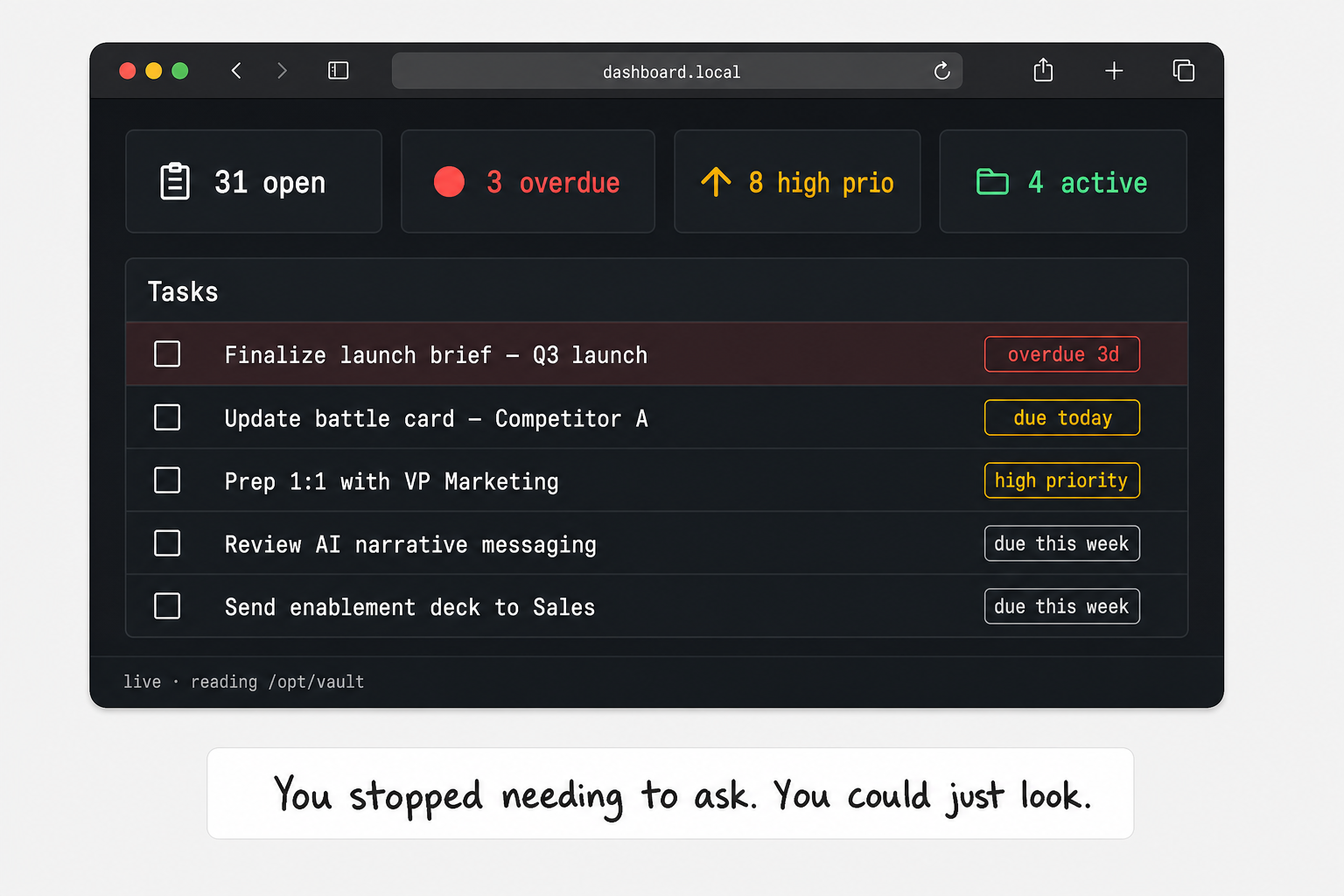
The top of the dashboard has four numbers: open tasks, overdue, high priority, active projects. Those four numbers tell me what I need to know in the gap between meetings. Clicking any number takes you to the filtered task view.
Below the numbers: the weekly plan and today's plan, rendered from their markdown files. The weekly plan has three tabs (priorities only, day-by-day breakdown, full document). Pick the view that fits the moment. The plan is always current because it's always reading the current file.
Quick Notes shows today's inbox: 30-Inbox/Daily/YYYY-MM-DD.md. Whatever landed there during the morning micro-daily is visible immediately. Same file. Same location.
Open Tasks aggregates from every MOC file the system knows about: Contentful, JTC Korfbal, personal todos, running plan. Sorted by overdue first, then high priority, then due date. Three filter buttons: All, Overdue, High Prio. The parser is regex against the task syntax:
_TASK_LINE_RE = re.compile(r"^\s*-\s+\[(.)\]\s+(.+)$")
_DUE_RE  = re.compile(r"📅\s*(\d{4}-\d{2}-\d{2})")
_PRIO_RE = re.compile(r"(⏫|🔼|🔽)")
That's the full parser. Date extraction, priority extraction, overdue calculation, all from the string. No schema. No migration. The same syntax that Obsidian renders as a checkbox with a colored dot, the server reads as structured data.
Context switching
One thing I learned building Charles: context discipline is the difference between a useful briefing and a noisy one. Charles in JTC Korfball mode should not surface Contentful tasks. Charles planning a training week should not bring up club coordination issues.
The web UI mirrors that discipline. Four contexts in the sidebar: Contentful, JTC Korfbal, Personal, Running.
Each context knows which MOC files to parse for tasks, which project folders to surface, which research directories to browse. Contentful context reads from the Contentful MOC and its two project sub-MOCs. JTC reads from the JTC Korfbal file and the Teamindeling project. When you're in the Contentful context, you see Contentful tasks. Nothing bleeds.
SIDEBAR

⚡ Dashboard   — aggregate across all contexts
✅ Tasks        — all contexts, fully filterable
📋 Projects     — all active projects

💼 Contentful   — scoped: its MOCs, projects, research
🏐 JTC Korfbal  — scoped: club coordination, team planning
🏠 Personal     — scoped: todos, finance, relationships
🏃 Running      — scoped: training, analyses, exercises

📂 File Drop    — vault inbox for uploaded files
⚙️  Admin        — agent status, MCP health, system info
Each context view has tabs: Tasks, MOC, Projects, Research, Activity. The MOC tab renders the full MOC document as HTML. Wikilinks become Obsidian deep links. [[Contentful-Onboarding MOC|Onboarding]] becomes a link that opens obsidian://open?vault=2ndbrain-vault&file=Contentful-Onboarding MOC in the desktop app.
That wikilink conversion is the detail that keeps the web UI from becoming a rival to Obsidian. The web UI never claims to be where you edit. It's where you look. Editing happens in Obsidian. One click on any link opens the right file in the right app.
The update problem
A dashboard with stale data is worse than no dashboard. The useful version has to update when the vault changes. The naive solution is polling: fetch everything every ten seconds, compare, re-render. It works. It's wasteful, it adds unnecessary load, and it still introduces lag.
The implementation uses Server-Sent Events (SSE), a lightweight protocol where the server pushes updates to the browser as they happen, rather than the browser asking every ten seconds. The browser opens one persistent connection; the server sends a message the moment something changes.
  ┌──────────────────────────────────────────────────────────────┐
  │  watchfiles watching /opt/vault (debounce: 800ms)           │
  └──────────────────────────────┬───────────────────────────────┘
                                 │  file changed
                                 ▼
  ┌──────────────────────────────────────────────────────────────┐
  │  classify the changed path(s)                                │
  │                                                              │
  │  50-Areas/Contentful/      →  "contentful"                  │
  │  50-Areas/JTC-Korfbal/     →  "jtc"                         │
  │  20-Daily-Notes/           →  "dashboard"                   │
  │  50-Areas/Health-Fitness/  →  "running"                     │
  │  anything else             →  "vault"                        │
  └──────────────────────────────┬───────────────────────────────┘
                                 │  push to SSE queues
                                 ▼
  ┌──────────────────────────────────────────────────────────────┐
  │  browser receives event:  "contentful,dashboard"            │
  │                                                              │
  │  current page context in the list?  →  reload in 600ms      │
  │  current page context not in list?  →  nothing              │
  └──────────────────────────────────────────────────────────────┘
Context-aware updates. If Charles modifies a JTC file while you're in the Contentful context, the Contentful page doesn't reload. The watcher classifies changed paths by folder, pushes the affected context names over SSE, and the browser only reacts when the change is relevant to what's currently on screen.
The result: when Charles completes a task in the terminal during your morning planning session, it disappears from the Open Tasks panel in the browser automatically. When he captures a quick note with "capture this," it appears in the Quick Notes panel. The dashboard watches the vault the same way Charles does.
Quick capture from any device
One keyboard shortcut: Ctrl+K opens a quick note modal on the dashboard.
Type a thought, press Ctrl+Enter. The request goes to /api/inbox/capture, which appends a timestamped bullet to today's daily inbox file at 30-Inbox/Daily/YYYY-MM-DD.md. Same file. Same format. Same location Charles processes during inbox review.
On a phone via the home network (or VPN), this works identically. Open the dashboard, hit the capture button, type the thought. The note that enters through the browser is indistinguishable from one captured in the terminal. Identical file, identical syntax.
That's what one source of truth enables on mobile: not a special phone interface with its own sync logic. Just a browser pointing at the same server that reads the same files.
The admin panel
Moving Charles to a home server (covered in Part 10 of this series) created something I hadn't anticipated: infrastructure to maintain.
Four agents running as systemd services on a Linux box. Six MCP servers running in Docker containers through a proxy. A file watcher. The web server itself. Any one of them can fail quietly.
The first time Garmin data went stale, I noticed it on a Thursday when Charles's training recommendation ignored my Tuesday run. The Garmin MCP server had been stuck since Wednesday morning. The fix was a one-line restart. But I'd been working with outdated data for 36 hours without knowing it.
In a terminal-only world, the first symptom of an infrastructure problem is noticing something is wrong hours or days after it happened.
The admin panel makes the infrastructure visible.
Claude Agents. Four cards: Charles Vault, Eva, Jones, Sam (the running coach). Each card shows systemd uptime, RAM, and a green or red status dot. Click any card for full logs, recent memory usage, and a restart button. Uptime in days and hours. If a service crashed overnight, I see it when I open the dashboard in the morning, not at 10am when I notice Charles isn't reading the calendar.
MCP Servers. Six servers through the proxy: Google Calendar, Garmin, DuckDuckGo, Granola, Picnic, n8n. The panel shows each one: connected, stuck, or unknown, parsed from Docker container logs. Toggle a server off. Restart it. The Garmin server deserves its own note: Garmin uses multi-factor auth that expires periodically. The admin panel has a re-auth modal (a two-step code entry flow), so refreshing Garmin auth doesn't require touching a terminal.
System Resources. CPU, RAM, disk at a glance. Vault git sync status. Claude version with a one-click update check.
Authenticated Web. Sessions for sites that require login (LinkedIn, Substack), stored as Playwright auth state files on disk. The panel shows when each was last authenticated and whether the session is still valid (under 30 days). An expired session can be refreshed: clicking Authenticate starts a headless browser via noVNC in a new browser tab, you log in, the session saves automatically, the panel updates. No terminal.
  ┌─────────────────────────────────────────────────────────────┐
  │  CLAUDE AGENTS                              claude v1.x.x  │
  │                                                             │
  │  ┌───────────────┐  ┌────────────────┐  ┌───────────────┐  │
  │  │  Charles      │  │  Eva           │  │  Sam          │  │
  │  │  Chief of     │  │  Competitive   │  │  Running      │  │
  │  │  Staff        │  │  Intelligence  │  │  Coach        │  │
  │  │               │  │                │  │               │  │
  │  │  12d uptime   │  │  12d uptime    │  │  3d uptime    │  │
  │  │  ●  active    │  │  ●  active     │  │  ●  active    │  │
  │  └───────────────┘  └────────────────┘  └───────────────┘  │
  │                                                             │
  │  MCP SERVERS                                                │
  │                                                             │
  │  Google Calendar  ●  connected    Garmin      ●  connected  │
  │  DuckDuckGo       ●  connected    Granola     ●  connected  │
  │  Picnic           ●  connected    n8n         ●  connected  │
  └─────────────────────────────────────────────────────────────┘
The admin panel didn't add any capability to the second brain. It made existing capability visible. That turned out to be more useful than I expected. Invisible infrastructure you don't notice until it fails is a different kind of problem than infrastructure you can see.
What builds on top of what
Five articles back, this series described the vault: markdown files that give Charles persistent memory across sessions. Four articles back, CLAUDE.md gave him behavioral rules that survive every session restart. Three articles back, MCP gave him live context: calendar, health data, web access. Two articles back, the home server made him available around the clock.
The web dashboard is not a sixth layer. It's a different direction for the same layers.
The vault, CLAUDE.md, and MCP serve Charles's ability to reason and act. The web UI serves your ability to see. Same files. Different reader. The dashboard doesn't add data to the system. It adds a window into the system that works from a phone, a tablet, or a browser on any machine connected to the network.
That's the test I'd use for any interface you add to a system like this: does it add data, or does it add a window? An interface that adds data creates a sync problem. An interface that adds a window creates accessibility.
Obsidian is where I write and think. The terminal is where I direct Charles. The web dashboard is where I look. Three interfaces. One filesystem. No sync problem, because there's nothing to sync.
The vault doesn't know or care which interface reads it. Markdown files don't have opinions about rendering. What they contain (task state, project notes, priorities, daily plans, captured thoughts) is available to anything that can open a text file and parse it. Charles built the discipline for writing to those files consistently. The web UI benefits from that discipline without requiring anything new from it.
Back to that meeting in Amsterdam. The web UI worked the way I needed it to, not in a test, but two weeks after deploying it. Different meeting, different client day. Someone asked a question about my availability for a follow-up. I opened my phone, checked the dashboard: four overdue, eight high priority, three active projects. The picture was clear in ten seconds. I said yes to the follow-up, picked the right week, moved on.
Later that same week I ticked two overdue items done from my phone on the train home. Opened Obsidian that evening. Both were marked done.
One source. Multiple interfaces. No sync meeting required.
The Second Brain Stack. Next: the mobile capture loop. An idea at 11pm, a structured note by 9am.
The Second Brain Stack, in order:
- How I promoted my AI from chatbot to chief of staff
- The skills layer: what compounding actually looks like
- The vault: why the foundation matters before the AI does
- CLAUDE.md is not a prompt. It's a Personal Operating System.
- MCP: the live data layer your AI system is missing
- My AI Chief of Staff Used to Have Office Hours. Not Anymore.
- The interface layer: I built a web dashboard for my second brain (you are reading this)
No comments section here. If you have questions or want to discuss, the LinkedIn post is the place to go. I read every reply.
Enjoyed this? Read the extended cut on the Second Brain Stack Substack →